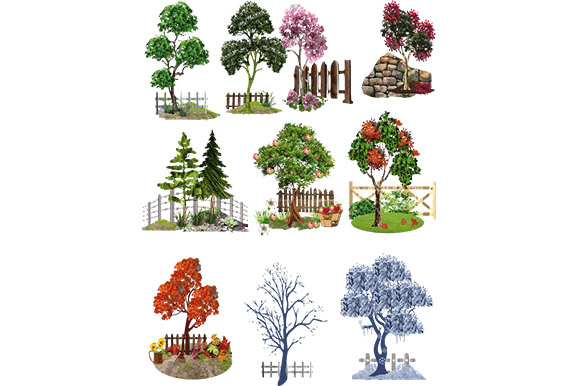
10 All Season Trees and Fence Set
Whether you’re building a virtual world, designing a landscape brochure, or crafting seasonal social media graphics, the right environment assets can make or break the scene. A Set of 10 All Season Trees and Fence offers a compact yet versatile solution: ten distinct tree models, each rendered for spring, summer, autumn, and winter, plus a matching fence element. This isn’t just another asset pack—it’s a timesaver that lets you shift from a lush July garden to a frosty December vista without hunting for new geometry or textures.
What Makes This Set Stand Out
At first glance, you might think “trees and a fence” is a simple combination. But the real value lies in the seasonal variants. Each of the ten tree species appears in four distinct states: bare branches, fresh green leaves, vibrant fall foliage, and snowy stillness. The fence structure is designed to complement any season, with a neutral wood finish that ages gracefully or can be recolored. Together, they form a cohesive environment kit that supports year‑round storytelling.
For creators who work across multiple projects—say, an e‑learning module on climates, a real‑estate visualization for a suburban development, or a mobile game level—this set eliminates the need to source separate assets for each season. It also maintains visual consistency because the trees and fence share the same artistic style, lighting approximations, and scale. That unity is often the hardest thing to achieve when mixing free or purchased assets from different vendors.
Creative Applications for Different Audiences
Graphic designers & illustrators can place these trees directly into posters, infographics, or website hero sections. The fence works as a repeating pattern for edges or a standalone element in a scene. Because the trees are shown in multiple seasons, you can create before‑and‑after comparisons, annual calendars, or educational diagrams about plant cycles without redrawing.
Game developers and 3D artists benefit from the uniform scale and optimized geometry. Use the trees as modular props in Unity or Unreal Engine—swap the seasonal texture based on in‑game time or location. The fence can be duplicated and rotated to form boundaries, garden partitions, or country paths. Beginners will appreciate having ready‑to‑use prefabs; professionals will value the time saved on environment dressing.
Bloggers and small business owners who need seasonal content for their brand can use these assets to create header images, email banners, or product mockups. A landscaping company, for example, can show a property in spring bloom and winter quiet using the exact same tree pack. That consistency builds trust with clients and makes marketing materials feel polished without a big production budget.
Educators and hobbyists can adapt the set for teaching seasons, weather, or ecology. The visual clarity of each tree’s seasonal change helps learners grasp concepts like deciduous cycles, leaf color chemistry, or habitat shifts. Pair the trees with the fence to illustrate human‑nature interaction—like how a backyard changes throughout the year.
Adapting the Set for Different Platforms and Formats
Because A Set of 10 All Season Trees and Fence comes as individual elements (likely in common formats like PNG, SVG, FBX, or OBJ, depending on the vendor), you can tailor them to your output medium. For print, use high‑resolution renders or vector versions. For digital, compress textures without losing detail. For web, cache seasonal variants so visitors only load the images they need.
If you’re creating a responsive web design, think about using the fence as a repeating background element that stays consistent across viewport sizes. The trees, meanwhile, can be placed as foreground accents or scroll‑triggered reveals. Because the set includes multiple angles (or can be rotated in 3D), you’ll never run out of composition options.
Marketers running A/B tests on seasonal ads can swap tree imagery between control and variant groups. For example, an outdoor gear brand might test a summer camp scene (green leaves, no fence) against an autumn hiking scene (orange leaves, fence in the distance). The assets are already season‑matched, so the only variable is the creative message, not the environment quality.
Practical Tips for Clear and Effective Use
- Maintain consistent lighting. Even if the trees come with baked shadows, check that your scene’s light direction matches the asset’s shading. If not, adjust with a slight color overlay or gradient.
- Use the fence as a depth anchor. Place it in the midground to create a sense of scale. Trees in the foreground can be larger, while distant trees shrink naturally—just resize uniformly to keep proportions.
- Recolor the fence sparingly. A neutral brown or grey works across all seasons. If you change its hue, make sure it still complements the tree barks (which tend to be warm browns or cool greys).
- Layer foliage carefully. When compositing multiple trees, use the seasonal versions that match the same time of year. Don’t mix a bare winter tree with a full‑summer tree unless you intentionally want a transitional landscape (e.g., early spring with one late‑leafing species).
- Respect the asset’s original orientation. If trees come with a specific base (a small mound of dirt or grass), keep that base aligned with the fence’s ground line. That prevents floating or clipping.
Realistic Project Ideas to Try
- Seasonal mood board. Arrange all four variants of one tree species in a 2×2 grid behind the fence. Use this as a quick reference for client pitches or your own design decisions. It instantly communicates “this set covers all bases.”
- Virtual garden walkthrough. In a 3D app, place ten trees along a curving path with the fence on one side. Duplicate the path segment and apply a different seasonal material to each copy. Link them via a slider or timeline to let users “time‑travel” through the months.
- Print calendar. For each month, pick a tree‑fence composition that matches the typical season in your region. January shows snowy trees, April shows budding branches, July shows full canopy, October shows fall colors. The consistent fence provides a recurring visual motif.
- Educational animation. Create a short loop where the fence stays still while the ten trees cycle through their seasons at different rates. This illustrates how different species respond to weather changes—some turn early, some stay green longer.
- Social media campaign. Use one tree‑and‑fence composition as a recurring background template, but update the tree season to match the current real‑world season. Followers will recognize the scene and look forward to the transition.
Keeping Results Organized and Audience‑Friendly
When you have ten trees with four seasons each, that’s 40 distinct assets plus a fence. A disorganized workflow can kill creativity fast. Start by renaming files in a logical pattern: tree01_spring.png, tree01_summer.png, etc. Use folders by season or by species—whichever makes retrieval easier for your specific project. If you’re working in a team, share a style guide that notes which tree species pair best with the fence (e.g., deciduous trees behind it, evergreens beside it for contrast).
For public‑facing work, always consider accessibility. If you use the set in a video, describe the seasonal changes in captions. If you publish a static graphic, add alt text that names the season and the tree type. This not only helps people with visual impairments but also reinforces your content’s relevance to search engines.
Beyond the Obvious: Interpretations and Variations
The phrase “A Set of 10 All Season Trees and Fence” might seem literal, but it opens creative translations. Use the fence as a metaphor for boundaries—literal or conceptual—in a storytelling project. The trees can represent growth, change, or resilience. For a brand that values sustainability, the seasonal cycle of the same trees becomes a powerful visual narrative about renewal and long‑term care.
You can also break the rules. Combine summer foliage with a winter fence by recoloring the fence frosty white. Or use only the bare winter trees as silhouettes against a sunset, with the fence acting as a subtle texture layer. The asset set gives you a reliable foundation, but your own artistic direction makes it unique.
A Few More Recommendations
- If the set includes 2D cutout trees, use them in parallax scrolling websites for depth without heavy 3D rendering.
- If it’s a 3D pack, reduce polygon counts for mobile AR apps by decimating the high‑poly trees and keeping the fence medium‑poly.
- For vector‑based projects, open the SVG files and adjust branch angles to vary the silhouettes—no two scenes need identical tree shapes.
Finally, don’t forget to attribute the asset creator if the license requires it. Even if not, crediting the original artist builds goodwill in the creative community and may lead to collaboration opportunities.
Explore, experiment, and let the changing seasons guide your next project. With a solid set like this, you can focus more on the message and less on the environment—and that’s exactly where creative energy should go.